POS invoice format: the columns, and what GST requires at the counter
· 9 min read
A POS invoice is the tax invoice your point-of-sale system prints at the counter, and POS is short for point of sale. It carries the same particulars as any other tax invoice: who supplied, who bought, what was sold, the quantity, the value, the tax charged and the total. The only thing the counter changes is the speed. Under the Central Goods and Services Tax Act, 2017, a registered person supplying taxable goods issues the invoice before or at the time of delivery, so at a counter the invoice and the handover happen together. That timing is the whole reason POS formats are narrow strips printed in one pass.
Below are the columns a POS invoice needs, a worked example with the tax split by line, and the one rule that catches most shops: the exemption for small sales is not an exemption from keeping the buyer happy. The blank layouts are the cash bill format and the GST invoice format, and the bill generator fills one in the browser.
What the law actually requires on it
Two sub-sections do the work, and reading them in order saves a lot of argument at the counter.
Section 31(1) of the Central Goods and Services Tax Act, 2017 says a registered person supplying taxable goods issues a tax invoice before or at the time of removal of the goods, where the supply involves movement, or before or at the time of delivery or making them available, in any other case. The invoice has to show the description, the quantity and the value of the goods, the tax charged on them, and the other particulars prescribed in the rules. A counter sale is the second case: nothing moves anywhere, so the moment of delivery is the deadline.
Section 31(3)(b) is the one people quote from memory and get slightly wrong. The text reads that a registered person may not issue a tax invoice if the value of the goods or services or both supplied is less than two hundred rupees, subject to such conditions and in such manner as may be prescribed. Two things follow. It is a permission and not a prohibition, so nothing stops you issuing one anyway. And it is conditional, so the conditions in the rules decide when it is available.
The columns on a POS invoice
A thermal strip is narrow, so every column has to earn its width. Eleven fields cover a compliant retail invoice.
- Supplier name, address and GSTIN, printed once at the top.
- Invoice number, from a consecutive series that does not restart mid-year.
- Date, and the time if your series repeats numbers across terminals.
- Buyer name and GSTIN, when the buyer is registered and wants credit.
- Place of supply, which at a counter is the state where the counter is.
- Description of each item, short enough to print and specific enough to identify.
- HSN code per line, at the number of digits your turnover requires.
- Quantity and unit, because a quantity without a unit cannot be checked.
- Rate per unit, and the taxable value for the line.
- Tax rate and tax amount per line, split into CGST and SGST for a sale inside the state.
- Invoice total in figures, with the rounding shown as its own line.
Why the tax is added per line and not on the total
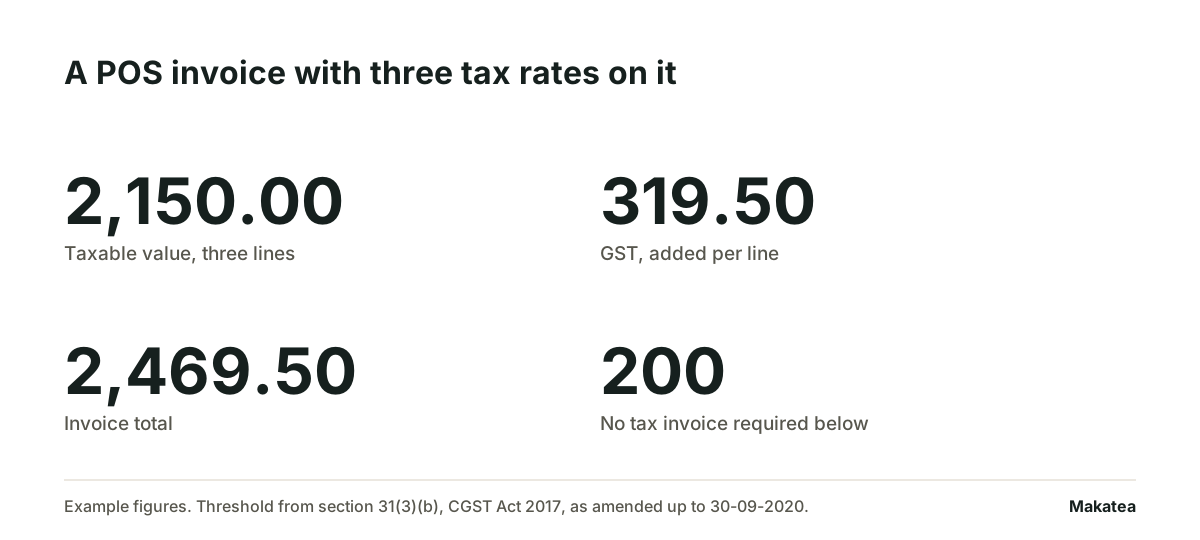
Three items on one strip can carry three different rates. A single tax line on the total hides which rate was applied to what, and that is the first thing a reviewer asks. So the format keeps a rate column on every line and a tax summary grouped by rate at the foot. The example below shows the shape.
| Line | Taxable value | Rate | Tax | Line total |
|---|---|---|---|---|
| Item A | 1,200.00 | 18% | 216.00 | 1,416.00 |
| Item B | 800.00 | 12% | 96.00 | 896.00 |
| Item C | 150.00 | 5% | 7.50 | 157.50 |
| Total | 2,150.00 | mixed | 319.50 | 2,469.50 |
The two hundred rupee rule, and where it stops helping
Here is the part worth knowing before you switch the exemption on in your POS software. Section 16(2) of the same Act sets out when a registered buyer may take input tax credit. Clause (a) requires that the buyer is in possession of a tax invoice or debit note issued by a registered supplier, or such other tax paying document as may be prescribed. Clause (b) requires that the buyer has received the goods or services. Clause (c) requires that the tax charged has actually been paid to the Government.
Read that against the exemption and the consequence is immediate. A one hundred and fifty rupee sale to a walk-in consumer can go out on a plain slip. The same sale to a business that wants credit cannot, because clause (a) asks for the invoice and the slip is not one. So the exemption is a convenience for consumer sales only. The moment a buyer reads out a GSTIN, the invoice gets issued whatever the value.
| Buyer at the counter | Value | What you hand over |
|---|---|---|
| Consumer, no GSTIN | Under 200 | Plain slip is allowed under section 31(3)(b) |
| Consumer, no GSTIN | 200 or more | Tax invoice |
| Registered business, gives GSTIN | Under 200 | Tax invoice, because credit needs it under section 16(2)(a) |
| Registered business, gives GSTIN | 200 or more | Tax invoice |
If you pay tax under composition, it is a bill of supply
Section 31(3)(c) says a registered person supplying exempted goods or services, or paying tax under section 10, issues a bill of supply instead of a tax invoice. The proviso to that clause carries the same two hundred rupee permission. The practical effect is that the document your POS prints changes name and drops the tax columns, because there is no tax to pass on. Printing a strip headed tax invoice while paying under composition is the error that gets noticed first.
Numbering, and the series that breaks in March
A POS series has to be consecutive and unique, and two terminals create two chances to break it. The cleanest arrangement is one prefix per terminal and one running number inside each prefix. Then a gap is visible and explainable, and the gap is what a reviewer looks for.
- One prefix per counter, so T1-00412 and T2-00412 are two different invoices and neither is a duplicate.
- No restart except at the start of the financial year, and the restart documented.
- Cancelled invoices kept in the series with the cancellation marked, not deleted.
- Offline sales numbered from a reserved block, so the sync does not mint a second number for the same sale.
When the counter sale becomes a receivable
Plenty of shops print a POS invoice and get paid later. The khata entry, the thirty day account for a regular trade buyer, the delivery that leaves before the cheque clears. At that point the invoice stops being a receipt and becomes a receivable, and the question changes from what the strip says to who still owes you.
Makatea records each of those invoices as a due amount with its date, sends the reminder on the date you set over WhatsApp and email, and stops the sequence for that buyer the moment you record the payment. It reconciles what you recorded against your account statement and orders the list by who to follow first. Makatea does not take the payment and does not hold the money: the money moves the way it already moves, and Makatea keeps the record and the follow-up. Pricing is published at /precios, and there are fourteen days free without a card.
Makatea is the better choice when the same buyers owe you on a repeating cycle and the work is the chasing rather than the selling. For one-off walk-in sales that are paid at the counter, the POS printer is the whole job and nothing needs to follow it. The related documents are the bill format for a plain charge and the debit note format when a price or a quantity has to be corrected after the fact.
Four mistakes that cost a reprint
- Tax on the total instead of per line, which hides the rate applied to each item.
- No HSN column, which turns the return into a reconstruction exercise.
- Place of supply left blank, which decides CGST and SGST against IGST.
- The buyer GSTIN typed from memory, which fails on the buyer side and comes back as a request to reissue.
Free on Makatea: proforma invoice template · free receipt template · free invoice generator
Frequently asked questions
What does POS mean on an invoice?
Point of sale. It is the invoice printed by the terminal at the counter at the moment of the sale. Legally it is an ordinary tax invoice, so section 31(1) of the Central Goods and Services Tax Act, 2017 applies to it like any other.
Is a POS invoice the same as a tax invoice?
Yes, when it carries the prescribed particulars. POS describes where it was printed and not what it is. If you pay tax under section 10, what the terminal prints is a bill of supply instead, under section 31(3)(c).
Do I have to issue an invoice for a sale under 200 rupees?
Not always. Section 31(3)(b) says a registered person may not issue a tax invoice where the value supplied is less than two hundred rupees, subject to the prescribed conditions. It is a permission, so issuing one is always compliant. And a registered buyer who wants input tax credit needs the invoice under section 16(2)(a) whatever the value.
Can one POS invoice carry two different GST rates?
Yes. Each line carries the rate notified for its own HSN code. Keep a rate column on every line and a tax summary grouped by rate at the foot, so the total can be checked against the lines.
Can I restart my POS invoice numbers?
At the start of the financial year, yes. Mid-year restarts break the consecutive series. With two terminals, give each a prefix and let the number run inside the prefix.
What if the buyer asks for the invoice after leaving?
Issue it against the same sale and the same series number. Do not mint a second number for one sale. If the price or quantity has to change, that correction goes on a debit or credit note and not on a new invoice.
Your recurring collections on autopilot
Makatea sends the reminders over WhatsApp and email. It records every payment and tells you who to follow up with first.
14 days free · No card
Keep reading
Material bill format: what it must carry, and how the final bill differs
A material bill is paid after someone matches it against the received note. Same description, same unit, same quantity, or it waits at the site office.
Terms and conditions on an invoice: sample wording, clause by clause
Most of a terms block is read by nobody. The five lines that change when you get paid are the ones carrying a number or a name.
eTIMS invoice in Kenya: what you issue when you bill the same fee every month
A reminder is not an invoice. In Kenya the invoice is the one that went through eTIMS, and how many you issue a month decides which solution you may use.
Makatea, recurring collections software on WhatsApp